Scan Available WiFi Hotspots in The Surroundings
Materials
AmebaD [RTL8722DM / RTL8722CSM / RTL8722DM MINI] x 1
Antenna x 1
Example
“Tools” -> “Board”“File” -> “Examples” -> “AmebaWiFi” -> “ScanNetworks”: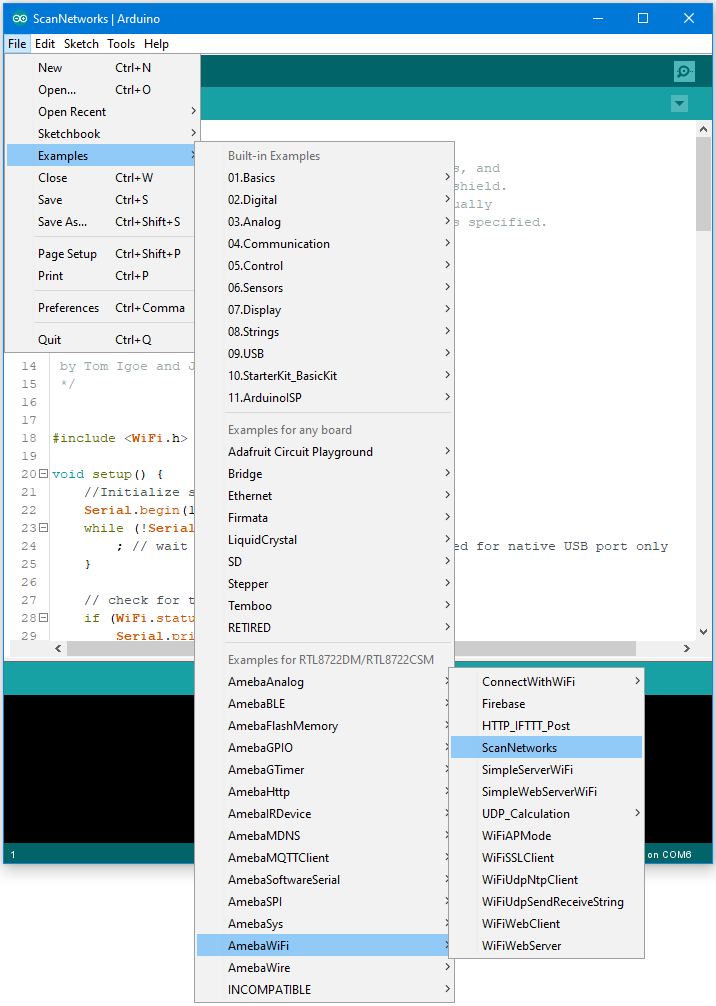
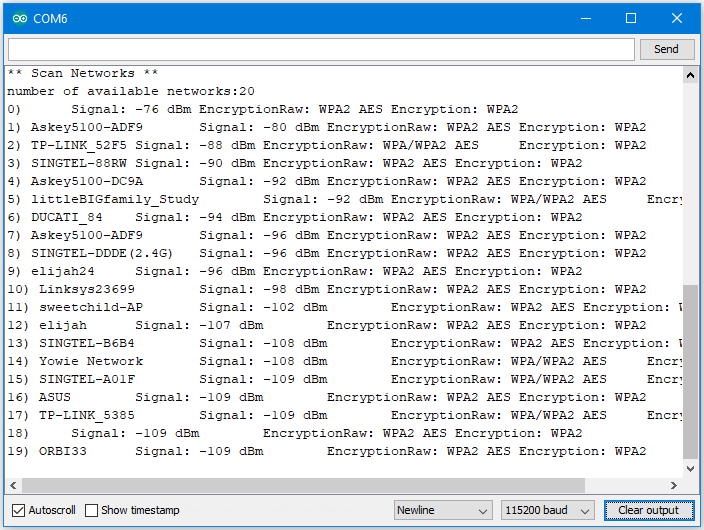
Then upload the sample code and press the reset button on Ameba. Afterwards, you can see “**Scan Networks**” message appears, with the detected WiFi hotspots and the information of each hotspot.
Code Reference
First we use
WiFi.macAddress(mac)to get the MAC address of Ameba: https://www.arduino.cc/en/Reference/WiFiMACAddressThen we use
WiFi.scanNetworks()to detect WiFi hotspots: https://www.arduino.cc/en/Reference/WiFiScanNetworksTo get information of detected WiFi hotspot: We use
WiFi.SSID(thisNet)to retrieve SSID of a network: https://www.arduino.cc/en/Reference/WiFiSSID We useWiFi.RSSI(thisNet)to get the signal strength of the connection to the router: https://www.arduino.cc/en/Reference/WiFiRSSIWe use
WiFi.encryptionType(thisNet)to get the encryption type of the network: https://www.arduino.cc/en/Reference/WiFiEncryptionType
Comparison with Arduino
#include to
use SPI to communicate with WiFi module.#include is not needed.